
Software Localisation: Process, Best Practices, and Examples in 2026
Launching your software in a new country is about far more than translating the text. It is about making your product feel as though it was built for that market from the very start. That is exactly what software localisation does — and in 2026, it is more important than ever for businesses that want to grow globally.
What is Software Localisation?
Software localisation (often shortened to l10n) is the process of adapting a software product for a specific region, language, or culture. This goes well beyond translation. It covers everything from date formats and currency symbols to colours, cultural references, legal compliance, and user interface design.
For example, a date written as “04/03/2026” means the 4th of March in the UK. In the US, that same string reads as the 3rd of April. A properly localised product handles this difference automatically — so that users never see the wrong information.
In short, what is software localisation in practice? It is the discipline of making your app, platform, or tool feel native to every user, regardless of where they are in the world.
Localisation Evolution: From Waterfall to AI-Native
The way teams localise software has changed dramatically over the years.
In the early days, localisation followed a waterfall model — translation only began after development was fully finished. This caused long delays, budget overruns, and poor consistency. Then came agile localisation, which aligned translation sprints with development sprints. Translators worked in parallel with developers, cutting lead times significantly.
1. Waterfall LocaliSation
In the waterfall approach, localisation was the very last step. After months of coding, developers would export all text into a massive spreadsheet and send it to a translation agency.
By the time the translations came back weeks later, the code had already changed. This created the delay for global launches and led to broken UIs that were expensive to fix.
2. Continuous LocaliSation
As the world moved to Agile and CI/CD, localisation became continuous. With a continuous approach, localisation happens in parallel with development. This allows for simultaneous releases in all markets – the day your English feature is ready, the French, German, and Japanese versions are ready too.
3. AI LocaliSation
We have now entered the era of AI localisation. This is not just about AI for translation, it’s also about using AI to manage the entire complex workflow. In this stage, AI acts as an orchestrator that:
- Assigns tasks: Automatically routes content to the right AI agent or human expert based on the technicality of the string.
- Pre-checks content: Analyses source text for errors or lack of context before translation begins, saving time and credits.
- Harvests context: Pulls data from code comments to ensure the “AI-Project Manager” knows exactly where a button lives.
- Signals missing context: Analyses your source strings before translation begins. If a string is ambiguous, AI will flag it as “Context Insufficient” and pause the process until the necessary data is provided.
- Maintains quality: Checks for ICU MessageFormat errors or brand consistency across all platforms (iOS, Android, Web).
Use this table to determine which localisation era you are in.
| Feature | Waterfall | Continuous | AI LocaliSation |
|---|---|---|---|
| Timing | Post-development (End of cycle) | Agile Sprints (Concurrent) | Real-time / Instant (On-commit) |
| Workflow | Manual file exports & emails | Repo Sync | Agentic Orchestration & Auto-PRs |
| Context | None (Static spreadsheets) | Visual (Screenshots) & Dev notes | Semantic (Vector DB, Multimodal, Code-aware) |
| Speed | Weeks / Months | Days | Minutes / Hours |
Today, the most advanced teams use AI-native, continuous localisation. Strings are extracted automatically, sent to linguists or machine translation engines the moment they are committed to code, and pushed back into the build pipeline with minimal manual steps. Thanks to advances in AI translation technology, this end-to-end automation is now accessible to businesses of all sizes — not just large enterprises.
Localisation, Translation, Internationalisation, and Globalisation: Key Differences
These four terms are often confused. Here is a clear breakdown:
| Term | Definition | Scope |
|---|---|---|
| Translation | Converting text from one language to another | Linguistic only |
| Localisation (l10n) | Adapting the full product for a specific locale | Linguistic + cultural |
| Internationalisation (i18n) | Building the product to be localisation-ready from the start | Technical/structural |
| Globalisation (g11n) | The overall strategy for entering global markets | Business strategy |
Translation: Convert words into another language
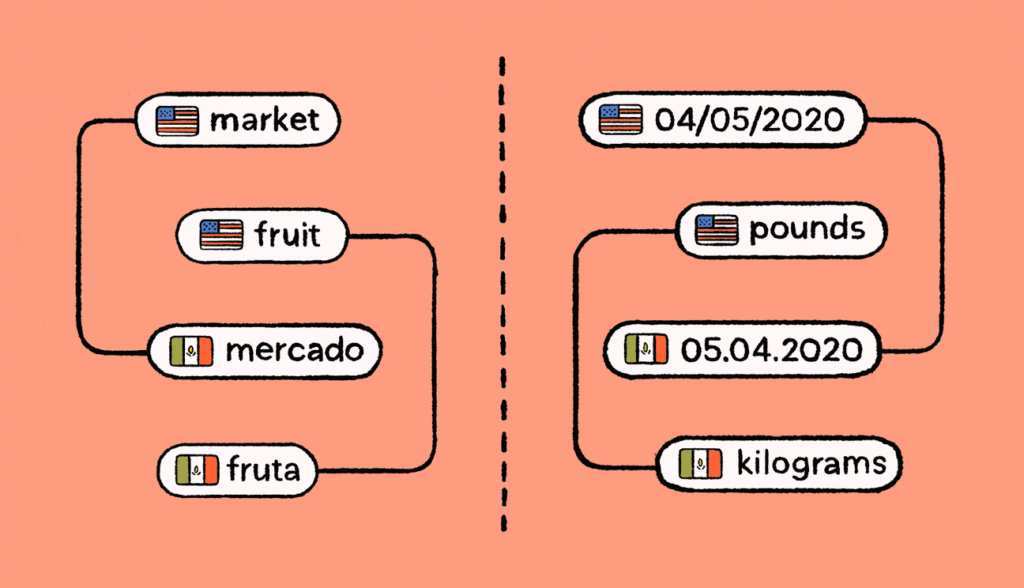
Translation is the process of converting all kinds of textual assets from one language to another. For software apps, this includes:
- Menus
- Buttons
- Feature names
- Error messages
- Support resources
- Other user-facing content
For example, you’ll translate “Settings” to “Paramètres” for your French users.
While translation factors in cultural nuances and market context, it’s specifically a linguistic exercise. Translation focuses more on using the right language and references to make the app feel native.
LocaliSation: Adapt your software for a specific region
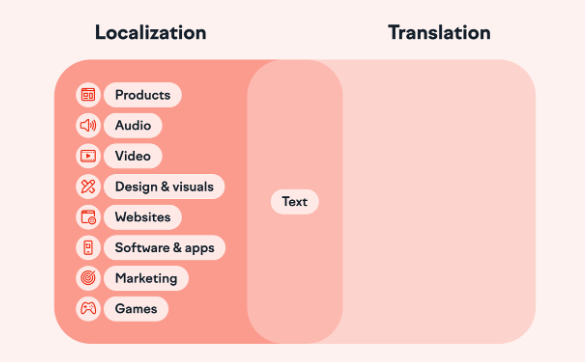
Localisation (or L10n) goes beyond translation. It’s a more in-depth, multi-stage process for modifying your app’s functionality, design, and content in line with local preferences.
Based on your software’s use cases, you’ll need to change:
- Date and time
- Currency signs
- Keyboard layouts
- Functional values
- Specific features
Put simply, localisation is a broad approach for tailoring your software to different audiences, and translation is a step in this process.
For example, if a financial platform built for New York-based businesses expands to Amsterdam, it has to implement many changes.
The platform would have to integrate with SEPA (Single Euro Payments Area) transfers, support IBAN-format bank details, and comply with EU VAT invoicing standards.
InternationaliSation: Design groundwork for localiSation
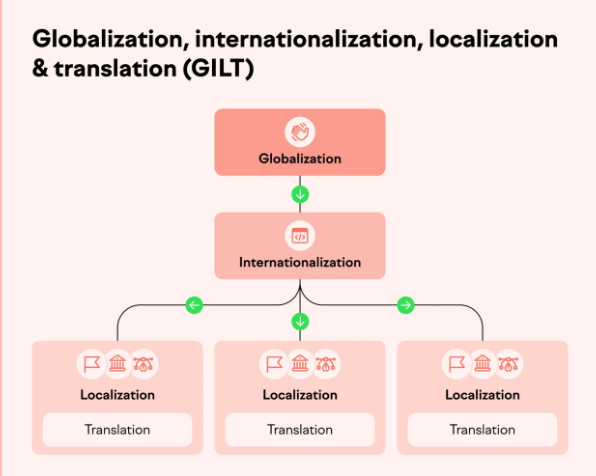
Internationalisation (or i18n) is the process of building software in a way that you can easily adapt it for other languages and regions in the future.
This approach builds the foundation for scaling your product to different regions without worrying about starting from scratch.
As a part of internationalisation, your developers have to:
- Store text in external resource files
- Avoid hardcoded date/time or currency formats
- Leave room to support right-to-left (RTL) languages like Arabic
- Make ample space for text expansion (some languages are longer)
For example, instead of hardcoding “Monday” in the UI, developers reference a language file. So, the term can change depending on the selected locale.
Understanding the difference between internationalisation vs. localisation is essential before beginning any localisation project. A product that has been properly internationalised is far cheaper and faster to localise, because the technical groundwork is already in place.
Software Localisation Tools and Frameworks
Here is the list of must-have technologies of a modern localisation stack.
1. Supported File Formats
Support for diverse formats is a requirement for technical integrity.
- Web & API:
JSON,YAML,XLIFF(the industry standard). - Mobile:
.strings&.stringsdict(Apple),Android XML(Android). - Documentation:
Markdown,HTML,DOCX. - Data & Config:
CSV,XLSX,PROPERTIES. - Standard-Native: Full support for ICU MessageFormat to handle complex plurals and genders within any of the formats above.
2. Use Framework-Specific i18n Libraries
Choose the right i18n library for your software. Look at type safety, bundle size, and developer experience. In 2026, these are the frameworks defining the modern localisation landscape:
Frontend
- Next-intl: The premier choice for Next.js (App Router). It leverages Server Components for zero-bundle-size translations and provides deep integration with Next.js routing.
- Lingui: Preferred by performance-first teams. Its “macro” approach compiles translations away at build time, resulting in the smallest possible footprint and excellent TypeScript support.
- React-i18next: The industry veteran. Highly flexible, with a massive ecosystem and support for virtually every edge case in React and standard JavaScript.
- Vue-i18n: The native-feeling standard for the Vue/Nuxt ecosystem, offering seamless integration with reactive components.
Backend
- i18next (Node.js): A library that works across all frameworks, perfect for sharing localisation logic between backend and frontend.
- Babel (Python) / Gettext: The reliable library for server-side localisation and traditional software environments.
| Framework | Recommended Library | Implementation Guide |
|---|---|---|
| Next.js | next-intl | Next.js Internationalisation (i18n) with next-intl |
| React | Lingui | React App Localisation with Lingui |
| Angular | Native | Angular i18n and Localisation Guide |
| JS / React | i18next | React i18n with i18next |
3. AI LocaliSation Platform for Developers
AI localisation platforms are essential for software localisation because they replace slow, manual workflows with real-time automation. Localisation platforms can understand your code’s context, and they eliminate “broken” layouts and mistranslations before they reach production.
This ensures your software stays synced with every commit, reducing both developer overhead and translation costs.
Types of Localisation Platforms
Localisation platforms are specialised tools that support organisations in adapting software, content, and digital products for diverse different languages, cultures, and regions. They vary in scope and functionality, offering different approaches depending on business needs.
- Translation Management Systems (TMS): Designed to handle large volumes of multilingual content, TMS streamline workflows with tools like translation memory, terminology management, and task automation.
- Content Management Systems (CMS): Many modern CMS now include localisation features, allowing teams to manage and publish multilingual website content within one environment.
- Globalisation Management Systems (GMS): Broader in scope, GMS cover translation, cultural adaptation, compliance, and overall internationalisation strategy.
- On-Premises Platforms: Installed on an organisation’s servers, these systems offer higher control and security, ideal for companies with strict data requirements.
- Software Localisation Platforms: Built for apps and software, these software localisation tools manage code integration, placeholders, and UI adaptation.
- Hybrid Platforms: Combine functions of multiple systems — for example, blending TMS capabilities with marketing localisation tools for end-to-end support.
Choosing the right platform depends on business needs, ensuring smooth workflows and successful global rollouts.
5 Different Ways to Localise Your Software
1. The Waterfall Model
Traditional and sequential. Localisation begins only after development is complete. This approach is slow and often leads to rework, but it remains suitable for small, infrequent projects.
| Benefits | Challenges |
| Fast time-to-market in your source language, as localisation starts after the product is launched | Delays the translation process and slows rollout in multiple languagesHigh risk of design breaks during translationHigh costs to fix localisation bugsRisk of poor UX |
2. Agile Localisation
Translation runs alongside development sprints. New strings are sent to translators as soon as they are ready, which cuts delivery time significantly and keeps quality high.
| Benefits | Challenges |
| More efficiency and flexibility when it comes to your localisation workflow | More complex and can require dedicated localisation engineers |
3. Continuous Localisation
Fully integrated into the CI/CD pipeline. Strings are automatically extracted, translated, and merged back into the build — often with no manual steps until the final quality review. This is the best approach for products with frequent releases.
| Benefits | Challenges |
| Catch design breaks at an early stage of product developmentGet feedback from all stakeholders soonerLower risk of localisation errorsLaunch in multiple new markets simultaneously | Potentially longer time to launch as localisation is integrated in the product development phase |
4. DevOps Deployment
DevOps takes agility even further by blending development and operations into one continuous process. Its focus on automation like continuous integration, delivery, testing, and monitoring can be a game-changer for localisation.
By integrating localisation into DevOps pipelines, teams ensure that translations are tested, deployed, and monitored with the same efficiency as code. The result? Faster releases, higher quality localised experiences, and the ability to respond quickly to global market changes.
| Benefits | Challenges |
|---|---|
| Translations are tested, deployed, and monitored with the same efficiency as code — enabling faster releases, higher quality localised experiences, and the ability to respond quickly to global market changes | Requires significant upfront investment in pipeline setup and cross-functional expertise in both DevOps and localisation workflows |
5. AI-Assisted Localisation
The newest and most efficient model. AI translation technology handles first-draft translation at scale, while human linguists post-edit and refine for accuracy and cultural fit. This approach reduces cost per word while maintaining high quality.
| Benefits | Challenges |
|---|---|
| Handles first-draft translation at scale while human linguists post-edit for accuracy and cultural fit — reducing cost per word without sacrificing quality | Raw MT output can be inconsistent, and AI models may struggle with highly contextual or culturally nuanced content without thorough human review |
How to Avoid the 17 Most Common Pitfalls & Best Practices
1. Not Accounting for Varying Language Lengths
The Mistake: Don’t assume every language is as concise as English. English text is often very compact in comparison to other languages—like German or Finnish—and translations can vary considerably in length and density.
Actionable Implementation Tips:
- Design for +50% and give strings room to grow and shrink
- The size of the interface must be adjustable to accommodate the length of translations provided at runtime.
- You can solve this problem by leaving extra space after each label for the string to grow. However, by doing so, the labels and controls might appear pretty far apart from each other in compact languages. Some developers give their labels room to grow and shrink by aligning them to the right or by placing them above the controls.
- You can also use layout managers that understand how locale affects a UI and manage the pixel positioning of widgets for you at runtime, so your interface will adjust properly.
- Another way to solve this issue is by storing the dimensions for a label in the locale resource file.
Why It Is Essential: If you don’t prepare for this and there isn’t enough space, your strings might overlap with other controls and the interface will require editing after translation.
2. Not Designing for Text Expansion
The Mistake: Many languages take up significantly more space than English. German, for instance, can be 30–40% longer. Failing to account for this causes UI elements to break, text to be cut off, and the user experience to suffer.
Actionable Implementation Tips:
- Design UI elements with at least 30–40% extra space for expanded text
- Use flexible, scalable containers rather than fixed-width elements
- Test all UI components with the longest translated strings early in the process
Why It Is Essential: A broken UI signals to users that the product was not built for them. It damages trust and increases abandonment — both costly outcomes in competitive international markets.
3. Hardcoding Strings in the Source Code
The Mistake: When developers embed text directly into the code rather than in separate resource files, it becomes nearly impossible to localise without modifying the codebase. This slows everything down and introduces bugs.
Actionable Implementation Tips:
- Store all user-facing text in separate resource files (e.g.,
.json,.po,.strings) - Enforce a no-hardcoding rule through code reviews and linting tools
- Use descriptive string keys to give translators the context they need
Example:
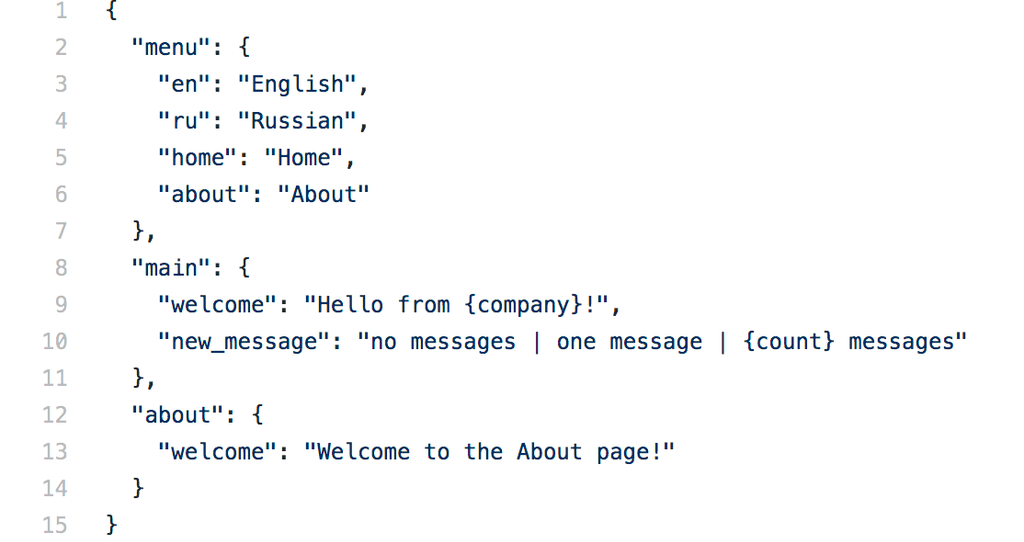
In Python, the GNU gettext system is quite a popular choice. A .po resource file containing the translatable strings is created for each locale:
# ./locales/en_US/LC_MESSAGES/messages.po
msgid "button_order"
msgstr "Order Now"
msgid "login_message"
msgstr "Welcome back!"
# ./locales/de_DE/LC_MESSAGES/messages.po
msgid "button_order"
msgstr "Jetzt bestellen"
msgid "login_message"
msgstr "Willkommen zurück!""
And the gettext function is used to get the appropriate translation:
import gettext
de_DE = gettext.translation('messages', localedir='locales', languages=['de_DE'])
de_DE.install()
print(gettext("login_message"))
# Willkommen zurück!
print(gettext("button_order"))
# Jetzt bestellen]
Why It Is Essential: Separating strings from code is the foundation of good multilingual technology solutions. Without this separation, every product update becomes a localisation bottleneck.
4. Ignoring Cultural Context
The Mistake: Direct translation can produce text that is grammatically correct but culturally inappropriate — or even offensive. This is particularly risky in markets with strong cultural norms or sensitivities.
Actionable Implementation Tips:
- Work with native-speaking linguists who understand local culture deeply, not just the language
- Build a brand glossary and style guide for each target market
- Review images, icons, and colour choices for cultural appropriateness before launch
Why It Is Essential: Cultural missteps can damage your brand in ways that are difficult to reverse. Learning how to localise your brand to an Asian market, for example, illustrates just how deeply culture affects every element of a product experience.
5. Skipping Internationalisation (i18n) or Not supporting Unicode
The Mistake: Trying to localise a product that was never designed for it leads to double the work. Missing support for Unicode, right-to-left (RTL) text, or locale-aware date formatting creates technical debt that compounds with every new market.
Actionable Implementation Tips:
- Build i18n support into your product from day one — not as an afterthought
- Use Unicode (UTF-8) encoding across the entire technology stack
- Implement locale-aware libraries for dates, numbers, currencies, and sorting
Example:
Specify the charset in the <head> of your HTML document:
<meta http-equiv="content-type" content="text/html; charset=utf-8">
Verify your HTTP server is sending the correct HTTP Content-Type header:
Content-Type: text/html; charset=utf-8
Use UTF-8 in your database:
# MySQL
CREATE DATABASE dbname CHARACTER SET utf8 COLLATE utf8_general_ci;
Why It Is Essential: Internationalisation is the infrastructure that makes localisation possible and scalable. Skipping it is one of the most expensive mistakes a product team can make.
6. Failing to Test in the Target Locale
The Mistake: Testing only in English will miss locale-specific bugs such as text overflow, broken character rendering, RTL layout issues, and incorrect number formatting.
Actionable Implementation Tips:
- Run locale-specific QA on every build, not just final releases
- Use pseudo-localisation to catch UI issues before real translations are available
- Include native speakers in user testing wherever possible
Why It Is Essential: Locale bugs undermine user trust and increase support costs. The website localisation guide for 2026 makes it clear: robust QA is just as important as quality translation.
7. Not Using Translation Memory
The Mistake: Translating the same phrases repeatedly wastes time and budget. Without Translation Memory (TM), project costs grow linearly with every update.
Actionable Implementation Tips:
- Invest in a TMS that supports Translation Memory from the very beginning
- Clean and maintain your TM regularly to prevent errors from propagating
- Apply TM matches consistently across all markets and content types
Why It Is Essential: Translation Memory can cut ongoing translation costs by up to 50%. It also ensures consistency across your product, support documentation, and marketing localisation materials.
8. Treating Localisation as a One-Time Task
The Mistake: Products evolve constantly, and each update introduces new strings. Treating localisation as a one-off project means falling behind quickly.
Actionable Implementation Tips:
- Build localisation into every sprint, not just major releases
- Assign a dedicated localisation owner or project manager per market
- Use continuous localisation tools that automatically detect and route new strings
Why It Is Essential: Markets evolve, and so do user expectations. Refer to the challenges in the translation industry to understand how continuous localisation is now an industry standard — not a luxury.
9. Overlooking Legal and Regulatory Requirements
The Mistake: Different countries have different laws around data privacy, content restrictions, and user rights. Ignoring these can result in fines, content removal, or being blocked from a market.
Actionable Implementation Tips:
- Conduct a regulatory review for every target market before launch
- Partner with local legal experts to review your localised product
- Stay updated on changing regulations such as GDPR, PDPA, and PIPL
Why It Is Essential: Legal compliance is non-negotiable. The global digital transformation trend shows that regulatory environments are diverging across markets, not converging.
10. Poor Glossary and Style Guide Management
The Mistake: Without consistent terminology, different translators will use different words for the same concept — creating a fragmented experience that confuses and frustrates users.
Actionable Implementation Tips:
- Build a glossary for every target language before translation begins
- Create a style guide that defines tone, formality level, and brand voice for each market
- Share both documents with every linguist and reviewer on the project
Why It Is Essential: Consistency builds trust. Creating multilingual website content and software that feels coherent across all markets requires disciplined terminology management from the very start.
11. Not Leveraging Machine Translation Strategically
The Mistake: Either avoiding machine translation entirely (and missing major cost and speed benefits) or using it without human review (and risking poor quality output).
Actionable Implementation Tips:
- Use MT for high-volume, lower-visibility content and human translation for high-impact strings
- Always post-edit MT output with native-speaking linguists
- Monitor MT quality over time using BLEU or COMET scoring
Why It Is Essential: Neural machine translation has matured to a point where strategic use delivers significant efficiency gains without sacrificing the user experience that your audience expects.
12. Specifying a Language But Not a Country
The Mistake: Sometimes a language differs depending on the country in which it’s spoken because different regions may speak and spell a shared language with nuanced differences (e.g., British English differs from American English).
Actionable Implementation Tips:
- Always use a full locale
- Be as precise as possible, and always use a full locale property instead of just a language.
- Locales contain both the language and the country code where it’s spoken, such as fr-FR (French in France) or en-GB (English in Great Britain).
- This allows your app to support alternate spellings, date formats, and other differences between two countries with a shared language.
Example:
# ./locales/en_US/LC_MESSAGES/messages.po
msgid "login_message"
msgstr "Hi there!"
# ./locales/en_AU/LC_MESSAGES/messages.po
msgid "login_message"
msgstr "G'Day Mate!"
Why It Is Essential: Specifying a language but not a country code can make localisation difficult.
13. Concatenating Strings
The Mistake: Some developers love to create concatenated pieces of sentences using placeholders, where the order of words and phrases is hard-coded.
Splitting sentences into several keys presumes grammar rules and a certain sentence structure. If you use conditional statements and conditionalise single terms or a portion of a sentence, the granularity of conditional text might cause confusion during the translation process.
In this (intentionally bad) example, the structure is fixed and the sentence is broken up into tiny strings:
msgid "welcome_back_msg_start"
msgstr "Hey "
msgid "welcome_back_msg_end"
msgstr ", welcome back!"
print(gettext('welcome_back_msg_start') + username + gettext('welcome_back_msg_end'))
# Hey John, welcome back!
Actionable Implementation Tips:
- Don’t assume grammar structures and be careful with granularity in conditional text
- The structure of the sentence will often be completely different in another language. Therefore, it’s best to create strings that are complete sentences.
- Translators must be able to control the structure of a sentence, change the order freely, and insert all kinds of prefixes, suffixes, and any other grammar elements.
- If a string contains a placeholder, always explain what each placeholder means and allow the translator to change the word order if necessary. Sometimes you are safer setting a condition at the sentence level.
Example:
Considering the above, here is a better example. The translator can freely move the placeholder and fully control the structure of the sentence:
msgid "welcome_back_msg"
msgstr "Hey %(username)s, welcome back!"
print(gettext('welcome_back_msg', username="John"))
# Hey John, welcome back!
Why It Is Essential: These word puzzles are very hard and sometimes almost impossible to translate, and will give translators a bitter hatred for your shenanigans, as they may only see parts of the sentence while translating and have to guess what belongs together.
14. Hard-coding Numbers, Units, Dates, and Times
The Mistake: Hard-coded date, time, or currency formats will cause trouble during the translation process, as languages and countries differ in date and time formats. 26.04.2015 or 04.26.2014? 14:00 or 2 p.m.? 1,000 miles or 1,609 kilometers?
Actionable Implementation Tips:
- As mentioned previously, never hard-code numbers, units, dates, and times, assuming that they don’t need localisation. Go for localisable strings instead, and let translators decide what’s best for their language.
- You can store all dates and times in a standard ISO format and use a library to format them for the given locale. It will also help to convert time to different time zones.
- The same applies to currencies and other number formats. So, always use a library with localised files for each of the locales your software needs to support.
Example:
Here’s an example using Python’s Babel library:
from babel.dates import format_datetime
from babel.numbers import format_currency
print(format_datetime(locale='ru_RU'))
# 26 июля 2013 г., 15:48:18
print(format_currency(10.50, 'EUR', locale='de_DE'))
# 10,50 €
print(format_currency(10.50, 'USD', locale='en_AU'))
# US$10.50
Why It Is Essential: Hard-coding dates, times, currencies, and units directly into your code is a problem because different countries format these things differently — “04/03/2026” means March 4th in the UK but April 3rd in the US, and “10,50 €” in Germany looks nothing like “US$10.50” in Australia. When these values are locked into the code, translators cannot adapt them, developers must manually fix every value for each new market, and locale-specific bugs become almost inevitable. Using a locale-aware library (like Python’s Babel) to handle formatting automatically is the only scalable solution.
15. Not considering vertical writing and right-to-left languages
The Mistake: Arabic, Hebrew, and some other languages go from right to left and East-Asian languages using Chinese—or traditional Mongolian, if you feel adventurous—characters have a long history of vertical writing.
Actionable Implementation Tips:
- Prepare for a complex text flow
- Don’t assume that the same rules apply to all languages and expect the need for implementing specialised versions for a complex text flow, e.g., vertical writing, and plan for languages that read right to left.
- When it comes to vertical writing, strings are, for example, not rotated by 90 degrees. Instead, single characters are placed under one another.
- You can include a direction string in the resourced strings and use that string to load a different stylesheet based on the current locale. There’s also a direction property in CSS.
Example:
h1 {
    direction: rtl;
}
<h1> Read me from right-to-left. </h1>
16. Creating Ambiguity Due to Lack of Context
The Mistake: When strings include variables, are used in a specific context, or have ambiguous wording, your translation vendor will likely have a hard time deciphering them. Translators usually work on files and strings in a context-free format. So, how will a translator know whether the single term “Contact” is a verb for a button or a noun for a label?
Actionable Implementation Tips:
- Provide localisation notes and use code comments
- Keep in mind to add comments and notes to the localisable files.
- Aside from glossaries and style guides, you can provide context information to translators directly in your source files. The more context you give—by writing notes for translators and providing alternate phrasings—the better.
- If you’re working with content in text-based code files (XML, HTML, JSON and so on), make sure to use code comments.
- If you handle your translations in a spreadsheet, you can easily add a column for context notes.
- For an even better understanding, provide screenshots.
Why It Is Essential: Remember that context is king when it comes to software translation and localisation—the more context, the better!
17. Using Images that Contain Text
The Mistake: Images are a great way to save localisation costs as they cut down the word count for translation and may even make your product easier to understand—not to mention they are visually more appealing to the reader.
Actionable Implementation Tips:
- Separate text from graphics
- If a text needs to be associated with a graphic, try to separate your text from the image and create the text as a separate component.
- If the text is separable, managing localised versions becomes a lot simpler.
- Ideally, images should not contain text at all, because it eliminates the need to translate it.
- Pay attention to cross-cultural differences too, as not all images and symbols carry the same meaning across borders.
Why It Is Essential: However, sometimes images that contain text can be a serious pain for translators and can slow down and otherwise hinder the translation process. In some cases, it could even result in you paying more money.
Key Localisation Elements
A complete software localisation project typically covers the following elements:
- UI strings — Button labels, menu items, error messages, and tooltips
- Date, time, and number formats — Locale-specific conventions (e.g., DD/MM/YYYY vs. MM/DD/YYYY)
- Currency and payment methods — Local formats and regionally preferred options
- Images and icons — Ensuring visuals are culturally appropriate and not misleading
- Fonts and text rendering — Supporting non-Latin scripts, double-byte characters, and RTL languages
- Audio and video content — Subtitles, voiceovers, and on-screen captions
- Help documentation and FAQs — Support content in local languages
- Legal and compliance text — Terms of service, privacy policies, and cookie notices
Understanding the different types of website localisation gives a useful framework for thinking about the full breadth of what needs to be adapted in a software product.
How to Plan for Software Localisation Testing & QA
Bake QA into Your Localisation Workflow
Do not treat QA as a final step. Build review and testing checkpoints into every stage of the localisation process. Use pseudo-localisation early to expose layout issues before translations are ready. Set clear, measurable quality criteria for each language and market.
Combine Automation with Human Expertise
Automated QA tools can catch spelling errors, formatting issues, missing translations, and truncated strings at scale. But human linguists are needed for nuanced issues — tone, cultural appropriateness, and brand voice. A hybrid approach delivers the best results. This is the same principle behind effective AI translation technology — combining the speed of machines with the critical judgement of people.
Feedback Loops > One-Way Handoffs
Build structured feedback channels between translators, developers, and QA testers. When a translator flags an issue, the developer needs to hear about it quickly — and vice versa. One-way handoffs create bottlenecks and increase the chance of errors reaching end users.
Key Aspects and Software Localisation Workflow
A typical software localisation workflow follows these steps:
- User Interface (UI): Translating menus, labels, buttons, and system messages to ensure clarity and usability.
- Multimedia Content: Localizing dialogue, subtitles, and audio for applications with video or interactive elements.
- Documentation: Translating manuals, FAQs, and help files to support user understanding.
- Cultural Adaptation: Adjusting visuals, symbols, and layouts to reflect local norms and avoid misinterpretation or breaking any local regulations.
- Regional Formatting: Adapting dates, times, currencies, numbers, and input methods to local standards.
- Legal Compliance: Incorporating region-specific disclaimers, privacy policies, and licensing requirements.
- Functional Adjustments: Modifying or omitting features that may not suit local markets.
- Time Zone Support: Ensuring scheduling and time-sensitive functions align with regional time zones.
- Testing & Quality Assurance: Validating each localised version to confirm consistency, accuracy, and functionality.
For web-based products, automating the localisation of multilingual sites can handle steps 2 through 6 almost entirely without manual intervention — saving time and reducing human error.
Breaking Down the ROI of Software Localisation
Localizing your app can pay off in many ways.
To calculate the ROI of your localisation efforts, start with this simple equation:
[(Revenue gain from localisation – Cost of localisation) / Cost of localisation] × 100 = ROI %
The revenue gained from localisation can include new user sign-ups, upgrades, or conversions directly coming from a local market. Check your attribute tools to get this data, and compare this growth in your localised vs. non-localised markets.
The cost of localisation covers expenses on translation, engineering, design, QA, and tool subscriptions. Remember to consolidate costs of human and software involved.
Now, let’s check out an example to see this formula in action.
Imagine you spent a total of $20,000 to localise your personal finance software for German users. This brought in an added revenue of $80,000 directly from Germany.
[(80,000 – 20,000) / 20,000] × 100 = 300%
So, your localisation ROI stands at a whopping 300%.
Still on the fence about pouring your resources into this project? Here are a few high-impact ways localisation drives measurable ROI.
Greater Customer Satisfaction and Lower Churn
Users engage more deeply with products that feel native to their language and culture. Research consistently shows that people are more likely to buy, and to stay, when they can use a product in their own language. Localisation reduces friction at every stage of the user journey and makes support interactions faster and more effective.
Stronger Brand Value and Perception
A well-localised product signals investment, respect, and professionalism. It tells customers in new markets that you take them seriously. Marketing localisation and software localisation work together to build a brand that resonates locally while growing globally.
Competitive Advantage in Crowded Markets
In competitive markets, a fully localised product stands out. If a competitor offers English-only support and you offer native-language support, you win the user. The global digital transformation trend is accelerating this dynamic — every market is becoming more digitally sophisticated and more demanding of locally adapted experiences.
Long-Term Cost Efficiency
Localisation costs fall over time as translation memories grow, workflows mature, and automation handles more of the process. Teams that invest early in proper i18n and TMS infrastructure reduce their per-locale cost with every subsequent release.
Industries That Need Software Localisation
Virtually every industry that operates across borders benefits from software localisation. It is especially critical in:
- Fintech and banking: Compliance, trust, and currency support are non-negotiable. Multilingual retail and e-commerce solutions and banking platforms must meet strict local regulatory standards.
- Healthcare and life sciences: Accuracy is life-critical. A mistranslation in a medical device interface or clinical trial software can have serious consequences.
- E-learning and EdTech: Training document translation and platform localisation ensure learners engage fully with content in their native language.
- Gaming: Gamers expect fully immersive, culturally adapted experiences. Poor localisation is immediately noticed and widely criticised in gaming communities.
- Enterprise SaaS: Global enterprise tools must work seamlessly across all the regions where employees and customers operate.
- E-commerce: Product descriptions, checkout flows, and customer support all need to feel local to convert international shoppers.
Localisation Challenges
Even with the best tools and processes in place, software localisation presents real challenges:
- Linguistic complexity: Some languages have structures that are very difficult to handle programmatically, such as gendered nouns, plural forms, and honorifics
- Context loss: Translators often lack the visual context they need to translate strings with full accuracy
- Rapid content updates: Frequent product releases can outpace translation teams if the workflow is not automated
- Consistency across languages: Maintaining consistent terminology and tone across 10+ languages requires strong governance and tooling
- RTL language support: Right-to-left languages such as Arabic, Hebrew, and Farsi require significant UI changes
- Technical debt from poor i18n: Products that were not built with internationalisation in mind require costly rework before localisation can begin
Understanding the challenges in the translation and localisation industry helps product teams build more realistic project plans and invest in the right infrastructure from the start.
5 Companies That Have Set the Bar High for Software Localisation
1. Microsoft
Microsoft localises its products into over 100 languages, with dedicated regional teams, detailed per-language style guides, and a mature translation memory infrastructure. Their continuous localisation pipeline means that Windows, Office, and Azure updates ship in multiple languages simultaneously — not weeks later.
2. Airbnb
Airbnb operates in more than 60 countries and invests heavily in cultural adaptation, not just translation. Their localisation team works closely with product designers to ensure that the booking experience feels intuitive and familiar to users in every market — from payment methods to how dates are displayed.
3. Spotify
Spotify has localised its app into dozens of languages while also adapting its content discovery algorithms for regional music tastes. Their approach treats localisation as a product function — not a post-production task — which allows them to launch new markets quickly and confidently.
4. Netflix
Netflix is widely regarded as a gold standard for media and software localisation. Their subtitle, dubbing, and interface localisation programmes cover 30+ languages, and their investment in local-language original content takes cultural adaptation to an entirely new level.
5. WhatsApp (Meta)
WhatsApp supports over 60 languages and has been instrumental in driving mobile adoption across markets where English literacy is limited. Their lightweight, locale-aware interface design has made them the dominant messaging platform across Southeast Asia, South Asia, Latin America, and Africa.
Software Localisation for Beginners in 5 Steps
If you are new to localisation, here is a practical starting point:
Step 1: Internationalise your codebase
Before a single word is translated, make sure your product is technically ready. Separate all text strings from the code, implement Unicode support, and ensure your UI can handle text expansion and RTL layouts.
Step 2: Identify your target markets
Prioritise the locales that offer the greatest commercial opportunity. Consider factors such as market size, existing user base, competitive landscape, and the complexity of the localisation required. Understanding the impact of globalisation on large markets can help you make smarter prioritisation decisions.
Step 3: Choose your localisation tools and partners
Select a Translation Management System that integrates with your development pipeline. Decide which content will be handled by professional human translators and which is suitable for machine translation with post-editing. Look for software localisation tools that support automation and translation memory from day one.
Step 4: Build your glossary and style guide
Before translation begins, create a terminology glossary and a brand style guide for each target language. This ensures consistency from the very first string — and prevents costly corrections further down the line.
Step 5: Test, launch, and iterate
Run comprehensive locale-specific QA before launch. Gather user feedback from native speakers in your target markets. Use that feedback to improve the next release. Treat localisation as a living, evolving process — not a one-time project.
For products with a digital interface, reviewing website localisation best practices for 2026 offers a highly relevant parallel set of principles.
What Makes Software Localisation Process Important?
In today’s hyper-connected world, businesses no longer have the luxury of speaking to just one audience.
The software market is projected to grow with an impressive figure of billions of dollars from 2025 to 2030. This means a rapid need for a localised software product to be available on a global scale.
Customers expect products, services, and content to feel natural like they were designed specifically for them.
Localisation involves not just translation; it’s about creating experiences that resonate across cultures, languages, and lifestyles.
Here’s why software localisation efforts is a game-changer:
- Makes experiences intuitive: People connect more easily with products in their own language. According to research, language matters to different target audiences, and won’t even bother with a product or service that does not speak their native or particular language. Software localisation removes that barrier, making software products and content feel effortless to use.
- Shows cultural respect: Small cultural details matter. Aside from language translation, colours, images, idioms, and even humor are taken into account. Adapting to local norms avoids misunderstandings and demonstrates that a brand values its audience beyond the transaction.
- Opens doors to new markets: Localisation process is often the key to reaching regions that were previously untouchable. A product that feels “local” can suddenly become relevant to millions of new users.
- Builds a competitive edge: In crowded industries, being the brand that understands local market, and audiences sets you apart. Competitors who neglect software localisation process risk being seen as out of touch.
- Drives real business results: Users don’t just feel more comfortable in their own language — they buy more. A global survey revealed that consumers prefer content in their native tongue, and won’t purchase at all if it isn’t available. That’s not just a preference for a target user; it’s a bottom-line issue.
- Keeps your brand consistent: Localisation adapts the surface such as words, visual layout, design elements, and formatting while protecting what matters most: your brand’s voice and values. The message stays the same, but it feels right everywhere.
- Avoids legal headaches: Every market comes with its own local law and regulations. Software localisation process ensures your product plays by the rules, reducing compliance risks and protecting the brand from breaking local regulations.
- Builds trust and loyalty: When users feel a product was crafted with them in mind, trust grows naturally. Over time, that trust turns into loyalty, repeat business, and word-of-mouth advocacy.
- Boosts engagement: People engage more with content, visual layout, and design elements that feel familiar. Products with successful software localisation invite feedback, inspire community, and encourage deeper product usage.
- Makes support seamless: Customers who can ask questions and get help in their own language walk away with a better impression of the brand, and a better chance of sticking around. When software, and mobile apps support multiple languages user satisfaction is assured.
In short, software localisation isn’t just an add-on feature. It’s a strategic investment in people. A software localisation project transforms a product from “usable” to “loved,” from “accessible” to “indispensable.” And in a world where users have countless choices, that’s what makes all the difference.
Why Localise Software? Industry Numbers
If you want a return on your engineering and marketing work, you have to remove the language barrier. Data from the last few years proves that language is the biggest point of friction for your users.
1. Reach 90% of the Global Market
You do not need to translate your app into every language on earth. According to CSA Research, by supporting just 14 key languages, you gain access to 90% of global spending power.
Without localisation, you are limited to the 20% of the population that speaks English, leaving the vast majority of global wealth on the table.
2. People Buy What They Can Read
It’s a simple fact: users do not trust apps they cannot fully understand. CSA Research published other interesting numbers:
- 76% of users prefer to buy products in their native language.
- 40% of people will never buy from a website that isn’t localised.
3. Organic Visibility (SEO)
If a user in Spain searches for your tool in Spanish, and you only have an English site, you do not exist to them. Localisation makes you searchable in every market you target.
FAQs About Software Localisation
What is software localisation?
Software localisation is the process of adapting a software product — including its text, design, and functionality — to meet the language, cultural, and regulatory needs of a specific target market. It goes beyond translation to cover every element of the user experience.
Why is software localisation important?
Users are far more likely to use, trust, and pay for a product in their own language. Research by Common Sense Advisory found that 75% of consumers prefer to buy products in their native language, and 60% rarely or never purchase from English-only websites. Localisation is a direct driver of revenue growth, customer retention, and brand trust in international markets.
What are the challenges of software localisation?
The most common challenges include text expansion in certain languages, lack of context for translators, rapid product update cycles, maintaining consistency across multiple languages, supporting right-to-left scripts, and managing the technical debt that results from poor internationalisation at the outset.
What is Mobile App Localisation?
Mobile app localisation is the process of adapting a mobile application for a specific market. It includes translating UI text, adapting graphics and icons, supporting local payment systems, complying with app store guidelines in each country, and ensuring the app works correctly on devices popular in that region. It follows the same principles as software localisation but with an emphasis on the unique constraints of mobile — screen size, performance, and OS-specific requirements.
What is Agile Localisation?
Agile localisation is an approach where translation and cultural adaptation work runs in parallel with product development sprints. Rather than waiting until a product is finished, translators receive new strings continuously as the development team creates them. This dramatically shortens time-to-market and reduces the cost of late-stage corrections.
Who Needs a Localised Software and Software Localisation Services?
Any business that operates — or wants to operate — in markets where English is not the primary language needs software localisation. This includes SaaS companies, mobile app developers, gaming studios, e-commerce platforms, fintech providers, healthcare technology companies, media & entertainment, education & e-learning, government & nonprofits, travel & hospitality, startups & small businesses, and enterprise software vendors. If your product has users in more than one country, localisation is relevant to you.
What Can You Localise?
Software localisation applies to far more than just translating app interfaces. It extends across every digital touchpoint where users interact with your product — from operating systems and mobile applications to websites, games, and documentation. Understanding what can be localised helps teams plan their efforts strategically and deliver consistent, culturally relevant experiences.
- Operating Systems and System Software Localisation
- Mobile and Desktop Application Localisation
- Website Localisation
- Game Localisation
In a software product, you can localise virtually every user-facing element: UI strings and labels, error messages, help documentation, onboarding flows, push notifications, email templates, images, videos, audio content, date and number formats, currency displays, legal text, and even the underlying logic for locale-specific rules such as name order and address formats.
The different types of website localisation article provides a useful overview of the full spectrum of content that can and should be adapted for new markets.
How Much Does Software Localisation Cost?
Costs vary widely depending on the number of target languages, the volume and complexity of content, the level of human expertise required, and the tools and workflow infrastructure in place. A simple app localisation into one language might cost a few hundred pounds. A full enterprise SaaS localisation into 10 languages could run to tens of thousands. Investing in proper i18n upfront, using translation memory, and choosing efficient software localisation tools will reduce costs significantly over the long term.
What Is the Most Efficient Way to Automate Software Localisation?
The most efficient method is to integrate localisation into your CI/CD pipeline via a CLI or API. Instead of manual exports, the system listens to your repository. When a developer pushes code to a feature branch, new strings are automatically synced to the localisation platform. Once translated, the platform opens a Pull Request back to your repo, making localisation a seamless part of the development lifecycle.
How Does AI Localisation Handle Code Variables and Placeholders?
AI handles variables (like {name} or %d) using context-aware prompting. Modern platforms provide the LLM with the Key Path and developer notes, signaling that certain strings are code-logic, not just text. For complex logic like ICU MessageFormat, high-reasoning models ensure that pluralisation and gender rules are adapted correctly without breaking the underlying code syntax.
Can I LocaliSe My App without a Full Redeploy?
Yes, through Over-the-Air (OTA) updates. By using a dedicated Localisation CDN, you can push text changes, fix typos, or even launch new languages directly to your users’ devices. This bypasses the need for App Store reviews or a full production build, allowing for real-time linguistic hotfixes.
How Do You Prevent UI “Breaking” After Translation?
Developers use pseudolocalisation to test UI resilience. This process replaces source text with elongated, accented characters (e.g., Settings becomes [!!! Śééttííññĝś !!!]) before actual translation begins. This identifies hardcoded strings that were missed and highlights layout overflows caused by languages like German or Italian that often take up more space than English.
Take the Next Step With Elite Asia
Whether you are localising your first mobile app or scaling an enterprise platform across a dozen Asian markets, expert support makes all the difference. Elite Asia’s specialist team combines linguistic expertise, cultural depth, and technology-driven workflows to deliver localisation that truly resonates with your target audience.
Explore Elite Asia’s App & Software Localisation Services →
From multilingual technology solutions to media and marketing translation, Elite Asia is your trusted localisation partner across Asia and beyond.